In the last issue of PMM we briefly covered Bosch’s new diagnostic offering for Teslas. In this issue we find out more about how the ESI[tronic] platform enables all service and diagnostic tasks on Tesla vehicles.
Tesla pursues different solutions for diagnostics and service work compared to traditional vehicle manufacturers. With the help of a customised diagnostic approach from Bosch, ESI[tronic] will support the challenge of diagnosing the manufacturer’s Model S, X, Y, and Model 3. Work on Tesla vehicles can be logged and saved as usual. All data received from the vehicle can also be logged.
Diagnostics (Fig 1)
Switching from ECU-based diagnosis to vehicle diagnosis due to use of HPCs (High- Performance Computers) in the vehicle.

Main functions of vehicle-based diagnostics:
- Vehicle State: One sight overview of the alerts and errors in the car with links to the original troubleshooting instructions.
- Functions: Perform adjustment, maintenance and repair tasks, e.g. brake pad replacement or 12V battery change.
- Actual Values: Display a series of live actual values.
- Service Tasks: A pre-filtered list of service-relevant tasks with links to the necessary instructions.
- Logging: You can log all data and your work on the Tesla vehicle with the ESI[tronic].
Original documents (Fig 2)
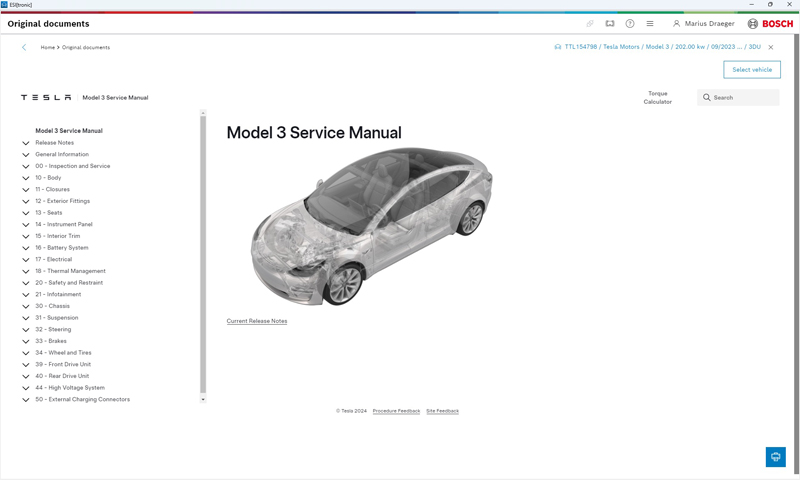
- Integrated repair information from Tesla under the Original documents function in ESI[tronic]
- Display service and repair information for identified Vehicle
- Bi-directional linking of diagnostic content: Performing tasks directly on the vehicle without leaving the Original documents
- Print manuals for flexible working
Connectivity
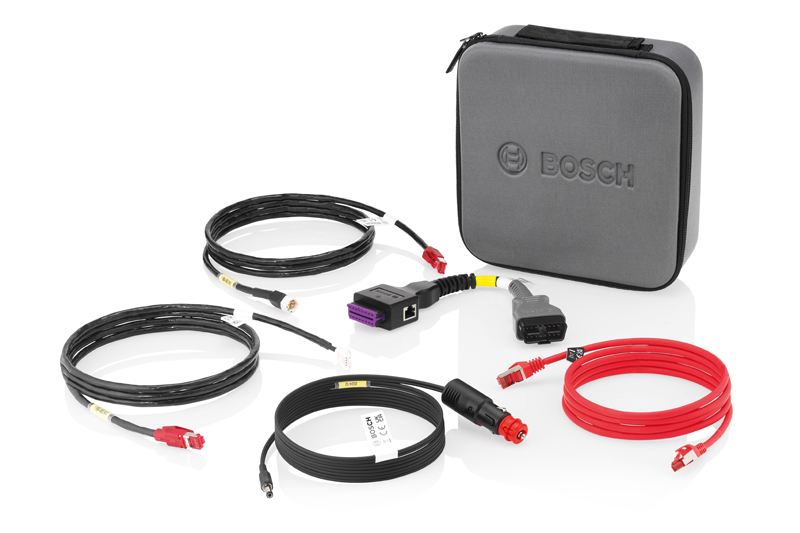
- Connect Tesla via KTS 560/590 Vehicle models up to 2023 are connected to the KTS 560/590 via a special adapter and an additional cable. Vehicle models up to 2024 are connected directly to a KTS 560/590 as usual via the OBD interface. No additional cable is required.
- Connection from Network plug on PC/Laptop/ DCU to Ethernet-Plug in Tesla also possible with Tesla specific adapters.
- Since software update 2025/1 Full Support on Model 3, Model Y, Model X and Model S
For more information, click here.